The full review
 ReviewGmail
I have used Gmail on Android as my main inbox for years, so for this review I treated it like a new app: a fresh sign-in on a mid-range phone, no saved filters, and two accounts, one personal and one for work, for the week of Oct 27. Can you run a working week from the Android app, or is it still what you glance at before opening a laptop? My short answer is yes, if you spend twenty minutes on setup the app never asks you to do.
Part 1 · 1 of 3A Monday inbox in ten minutes
My Monday starts with about forty unread messages: newsletters, invites, a few threads that need a real answer and a pile of receipts. The Primary tab already pushes most promotions aside, so the first screen is mostly people I know. I archive with a swipe, star what needs a reply and leave the rest for the desk. The first thing I changed was the left swipe, from archive to snooze, because 'not now' is a more honest answer to most email than 'done'.
What makes ten minutes enough is search. A sender's first name plus one word from the subject finds a thread from last spring faster than I can scroll back to yesterday. Chips under the search box narrow results by attachment, date or unread without typing operators, though from: and has:attachment still work. On a slow train connection results arrive in a second or two, which decides whether you search on the phone at all.
Part 1 · 2 of 3Where Gmail stops and the office suite takes over
Gmail on Android does not try to be a full office suite, and I think that is right. Attachments open in Docs, Sheets or the PDF viewer, and a file I want to keep goes to Drive in one tap, which matters when your cloud storage is shared with photos and phone backups. Invites arrive as a card with Yes, No and Maybe, so I rarely open Calendar just to accept a meeting.
For teams the split is less tidy. Chat and Spaces can sit inside Gmail as extra tabs, and Meet calls start from the same bottom bar. I turned Chat on for the work account only, because a business email inbox with a chat badge invites interruptions. If your team runs project management or a CRM elsewhere, Gmail will not replace it; it is where the notification lands, not where the work is tracked.
Part 1 · 3 of 3Three habits that keep the inbox small
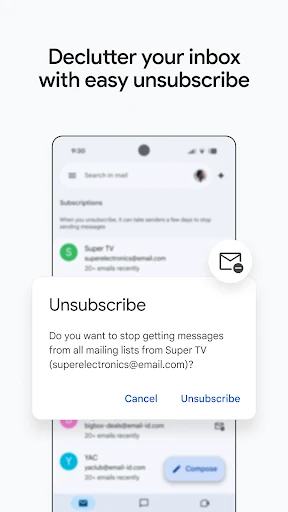
Habits matter more than features. I archive instead of deleting, because archived mail stays searchable and I have never regretted keeping a receipt. I unsubscribe from one newsletter a week using the link Gmail shows above bulk mail. And I keep exactly one label for threads waiting on someone else, called Waiting, which I check on Fridays.
None of this is clever, but on a phone it removes the guilt of an unread count. By Thursday the work inbox sat at zero most evenings. If invoicing or e-signature requests reach you by email, the Waiting label is where they belong until the other side replies.
Who Gmail is for
Gmail suits anyone who already lives in a Google account: Android owners, people whose documents sit in Drive, and small teams on Google Workspace who want business email, calendars and calls under one sign-in. It fits less well if you need end-to-end encrypted mail by default, if your employer standardises on Microsoft 365, or if you want one unified inbox across providers; Gmail can add Outlook or Yahoo accounts, but keeps them as separate inboxes.
The listing, as we checked it
- Developer
- Google LLC
- Version
- Varies with device
- Updated
- Oct 22, 2026
- Installs
- 10,000,000,000+
- Rating
- 4.1 out of 5
- Content rating
- Everyone
- Category
- Communication
- On Google Play since
- Sep 21, 2010
- Price
- Free
Source: Google Play listing for com.google.android.gm · checked Oct 27, 2026
The table comes from the Google Play listing on the day we checked it. Two lines deserve a closer look. 'Varies with device' means Google ships different builds to different phones, so there is no single version number to compare; the update date is the better guide.
The rating is lower than you might expect. Most recent complaints concern signing in after a phone change and notifications that arrive late on phones with strict battery saving; both come up below.
Gmail in depth
Part 2 · 1 of 5First impressions and setup
Because Gmail comes preinstalled, setup usually means signing in. The app picks up the phone's Google account, and a second account takes three taps from your profile picture. What it never does is walk you through the settings that matter, so here is my order: notifications per account, swipe actions, conversation view, then inbox type.
Notifications are the big one. By default Gmail alerts you to every Primary message, which on a busy work account means dozens a day. I set the work account to High priority only and left the personal one on all mail. That single change made the app pleasant to live with.
Part 2 · 2 of 5The core experience: reading, replying, finding
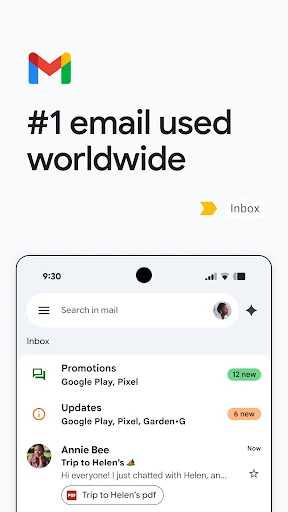
Reading is fast and clean. Threads collapse older messages, quoted text hides behind a fold, and newsletter images load as you scroll. Replying shows the limits of a phone: long answers are still easier on a keyboard, so I use Smart Reply only for one-line acknowledgements. Finding is Gmail's strongest suit, across every label and archived thread.
Part 2 · 3 of 5Standout features: summary cards and Help me write
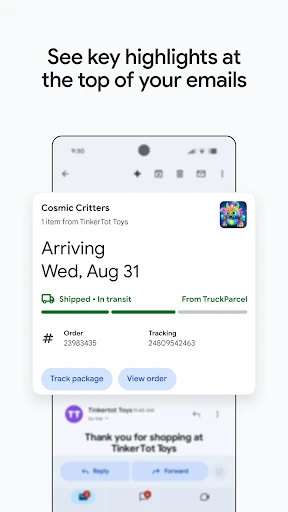
Summary cards at the top of some messages, such as flight bookings, parcels and bills, pull out the key detail, so I see a gate number or a delivery date without scrolling. They appear only for senders Gmail recognises, but then they save real time.
Help me write drafts an email from a short prompt using Gemini; it needs a Google AI Pro or Ultra plan and an internet connection. I used it for two polite declines and a follow-up. Each draft needed editing, but it beat a blank screen.
Part 2 · 4 of 5A practical workflow: from email to calendar to done
For anything that needs action I follow one routine. A meeting request gets accepted from the invite card. A document request gets the attachment saved to Drive and a one-line reply. A decision I cannot make yet gets snoozed to the morning I expect to know. On a Workspace account, an email can also become a task from the three-dot menu.
Part 2 · 5 of 5Limits
Gmail is not end-to-end encrypted by default; confidential mode blocks forwarding and sets an expiry, which is not the same thing. Summary cards and Smart Compose work best on Google accounts. And strict battery optimisation on some phones still delays notifications, so let Gmail run in the background.
My verdict
After a week I would keep Gmail as the default inbox on any Android phone signed into a Google account. It is quick, search is excellent, and the defaults are sensible once notifications are fixed. Summary cards and Help me write are useful extras rather than reasons to choose it.
If Google Play offers an update, take it: updates keep your mail, labels and settings, and the notes give no reason to postpone it. If you are switching from another mail app, set up two accounts as I did, live with it for a week, and judge it by how often you still reach for the laptop.
What I like
- Search finds old threads in seconds, even on a slow connection
- Per-account notifications make a work inbox bearable
- Summary cards show flight, parcel and bill details at a glance
- Updates keep mail, labels and settings in place
What I'd change
- Not end-to-end encrypted by default
- Gemini writing tools need a paid Google AI plan
- Late notifications on phones with strict battery saving
Gmail FAQ
Is Gmail free on Android?
Yes. The app is free, and a standard Google account includes 15 GB of storage shared by Gmail, Drive and Photos. Paid Google plans add storage and the Gemini features.
Can I use Gmail with an Outlook or Yahoo address?
Yes. Tap your profile picture, then Add another account, and pick the provider. Each account keeps its own inbox and settings.
Why do Gmail notifications arrive late?
Usually battery optimisation is pausing the app. In the phone's Settings, find Gmail under Apps and allow background activity, then check Gmail's own notification settings for that account.
Does updating Gmail delete my emails?
No. Your mail lives in your account, and an update through Google Play keeps labels and settings too. If the listing shows Open, you already have the build it offers your phone.
Is Gmail a good choice for business email?
For small teams, Gmail on Google Workspace adds a custom domain, shared calendars, Meet and admin controls. Organisations standardised on Microsoft 365 are usually better served by Outlook.